Cucumber is one of the most well-known tools in test automation. What is less well known is how widely this tool is misused. Let me try to explain and demonstrate why, in 99% of the cases, test automation projects do not need Cucumber. There is a better way.
If you don't believe me, will you believe the person who actually created Cucumber? In 2013, Aslak Hellesoy, the creator of the Cucumber tool, wrote a blog post, "The world's most misunderstood collaboration tool". It begins with the phrase: "If you think Cucumber is a testing tool, please read on, because you are wrong." It's like a scream to the community, a frustration that software development teams don't understand how Cucumber should actually be used. I highly recommend reading it first, to get your feet wet on this topic.
In 2020, he wrote another blog post on the current topic, "BDD is not test automation." Read it as well, just to understand that activities that are often called BDD are not actually BDD. Writing features and scenarios for test automation scripts is not BDD. BDD is an entirely different process that requires close collaboration of the whole team. QA does not perform any automation; the developer does, because they do the development, Behavior-Driven Development. Documented and automated behavior - drives the development. Outside-In. Not the other way around.
Breaking Myths
I would like to keep the focus on test automation, so I want to begin by breaking some myths about how automation engineers explain their decision to use Cucumber.
Myth No.1: "We use Cucumber so non-technical people (POs, BAs) can read test scenarios and execute them".
Well... let's be honest. POs and BAs don't really need to look at the Scenario that covers some automation flow. If they need, they will ask you, "Hey John, which of the scenarios that were demoed last sprint are automated? Can you show it?" PO will not spend his time trying to find the right feature file to read. Especially trying to execute it. How often did you see the PO that runs the "git clone" command? There can always be an exception; sometimes POs can be super technical, or maybe they were QA in the past. Or, the company was able to really adopt BDD! But in most cases, POs and BAs focus on project/sprint backlog planning, project timelines, and ensuring stakeholders are satisfied. They don't care whether the team has automated tests. They need the project completed on time, bug-free. Will it be done with automation or not - it does not matter to them.
By the way, you can write "human-readable" test scripts without Cucumber, so POs can read them if they really want. I'll show how later.
Myth No.2: "We use Cucumber, so non-technical QAs can write automated tests reusing already created step definitions"
This is possible, but super inefficient. Let me explain. Each test step in the Cucumber scenario will require creating a step definition that holds the actual code implementation. The number of lines of code for a single step depends on its scope. If the step says just "Click Submit button", then it's just one line of code in the implementation. But if the step says something like "User fills out the New Customer form", then the implementation will be bigger, to fill out all the fields in the form. Those step definitions were created by automation engineers, hoping that non-technical QA can reuse is when he/she needs to fill out the form or click submit in the automated scenario. Now, imagine the application's functionality has changed slightly, with the "New Customer form" including an optional checkbox. Non-technical QA can't use the existing step definition because it doesn't do what he needs. He goes to the automation engineer and asks to create a new step definition or update the existing one to handle the checkbox. Then PR. Then merge. Then "git pull" by non-technical QA, and he can move forward. And this process repeats again and again whenever non-technical QA can't continue the flow. How about if the test failed, for example, an element not found? Non-technical QA can't tell why it failed and how to fix it. Again, he/she will go to an automation engineer who can debug, fix, and create a PR.
Writing the test scripts that way becomes super slow and inefficient. It's only visibility that non-technical QAs contribute to automation. It can be proudly shown in beautiful presentations to management. But in reality, it just doesn't work and can be done better.
Myth No.3: "We use Cucumber as a level of abstraction for test implementation, so we can re-use step definitions and not copy/paste the code between tests."
Partially true with limitations. If you want to create an abstraction, i.e., wrap the code into a reusable component, Cucumber is not needed! Every programming language can do it :) Create whatever needed abstraction layers in the code and reuse it the same way! If you work in VS Code, using Cucumber can be difficult because the Cucumber extension isn't perfect, and many people have issues with IntelliSense and code completion. When you want to jump from the feature file to the step implementation with Cmd+Click (on Mac) or Ctrl+Click (on Windows), it sometimes doesn't work. So need to manually search the step definition file for the step name to find a particular implementation. When you have many of those steps, it's easy to get lost, which inevitably results in duplicated steps with slightly different names and the same or similar implementation.
If all you are looking for is a way to organize the test code, use the power of the programming language that you are working with. Cucumber is not needed and is harmful in this case.
So what do we have so far?
If your company does not have a vertically integrated Behavior-Driven Development process for software development, and Cucumber's scope in the framework is only for writing "human-readable" scenarios for test automation after the feature is implemented, Cucumber is simply not needed. As an automation engineer, you can do it better, faster, and more efficiently by choosing a different approach.
How?
The answer is - page objects!
True Page Objects
Page Objects - the most popular concept in the test automation world. But not all page objects are the same. There is no single standard, "best practice" that would be agreed and adopted by the community. Everyone has their own vision and implementation. I have my own. I think the only agreement in the community is a general definition of page objects: "Every page of an application has its own class/file, and this class/file has methods responsible for operations on that page." Sounds straightforward, but the number of possible implementations of this concept is endless. Every project I saw has its own "flavor" of page objects.
Here are the fundamental concepts of my approach:
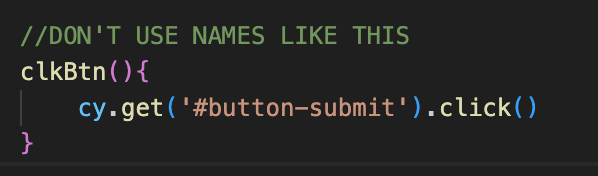
Naming! The most important part. The method names have to be well descriptive. No double meaning. After reading the method name, you need to understand exactly what it is doing. Good naming is actually harder than you think!
Slice by logic, not by pages, when needed. While the "class per page" approach mostly works well, it should not be a hard rule. If a large, reusable component is used across multiple physical pages, create a new class for it. Sometimes, the entire framework architecture is sliced only by logic groups.
Avoid multiple layers of abstraction. Try not to use more than 3 layers. Keep the architecture as simple as possible. First layer - tests. Second layer - implementation methods. Third layer - complementary reusable helper methods for the second layer.
Avoid tiny methods. Adding a single line of code to a method increases noise, maintenance effort, and complexity. Instead of reducing the number of lines of code in the project, you add more out of "thin air". Try to avoid as much as possible. It does not mean that it's no no. Just avoid.
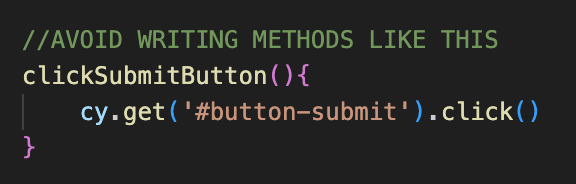
Develop a naming convention for the project and follow it! It's important to implement so that you or any other engineer can quickly navigate the project to find reusable components. For example: for all buttons naming is "click"+"textOnButton"+"Button". CamelCase. Or for all forms "fill"+"nameOfTheForm"+"Form". And so on.
Parametrize methods as much as possible. This way you increase the flexibility of how the method can be reused and reduce the number of lines of code in the project.
Keep locators inside the methods. Many of you will disagree, saying that locators will be duplicated in this case. But if you follow P.4 (avoid tiny methods), they will not. This significantly reduces maintenance effort and the number of lines of code. I can prove this statement, but it will require a separate article.
And the last one. Make sure methods hold as much logic as possible! Following P.4 and P.7, design methods are to be responsible for "sections" of application logic and user flow. This also simplifies framework maintenance down the road. For example, if you need to fill out a login form with a username and password, and click submit, don't create 3 methods: one to fill the username, one to fill the password, and one to click the submit button. Create a single method responsible for the login operation.
Overall, don't overcomplicate simple things. Don't try to impress your developers by introducing some fancy design patterns in the automation framework. Better try to impress the team with test stability, execution speed, and a fast feedback loop that can catch defects. Complex and flaky automation that the development team doesn't trust is useless.
Replacing Cucumber with Page Objects
Now, when I shared my recommended concepts for page objects, let's see how it can be used instead of Cucumber.
Imagine you have a login page that you are planning to automate, for example, this:

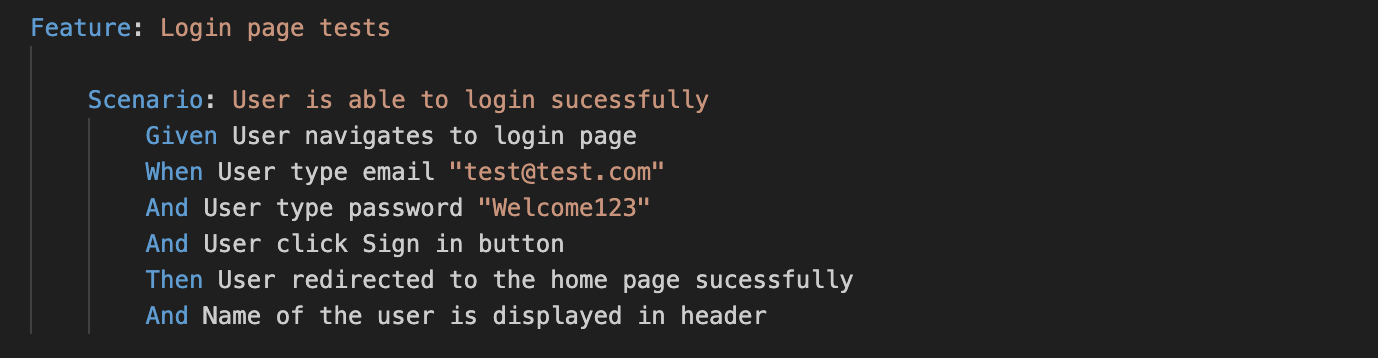
You create a Cucumber feature file and a new Scenario for it, which would look something like this:
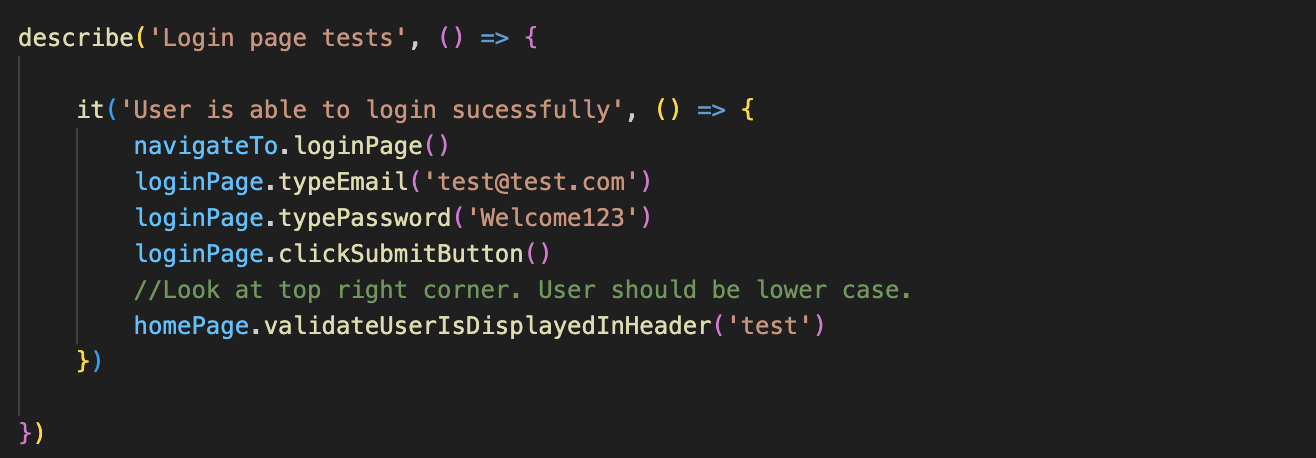
This is how the same scenario can be written with page objects in Cypress:
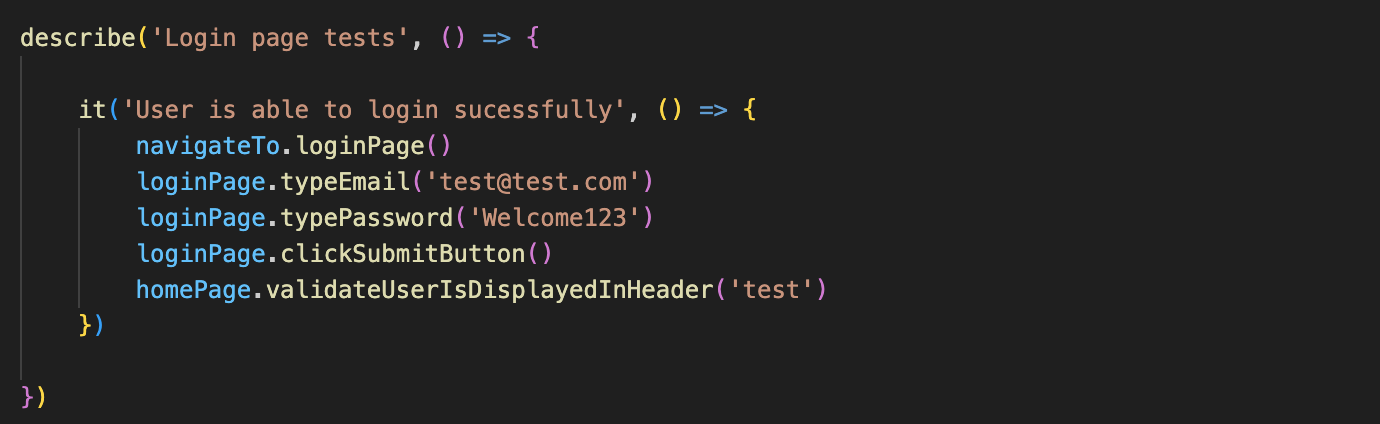
Is it readable? Yes! Can POs and BAs read and understand this scenario if needed? Yes! Are non-technical QAs, if you really want them, able to use these understandable methods to write tests? Also Yes!
Even if this "readability" is not enough, you can always add human-readable comments right into the code. No problem at all!
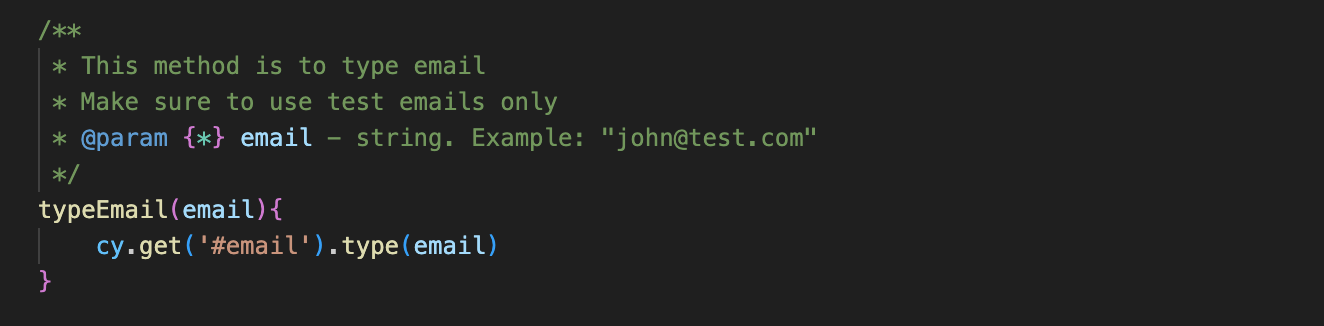
Even more. Using the power of IDE, you can add annotations to test methods, providing additional descriptions of what this method is doing and which parameters to use, like this:
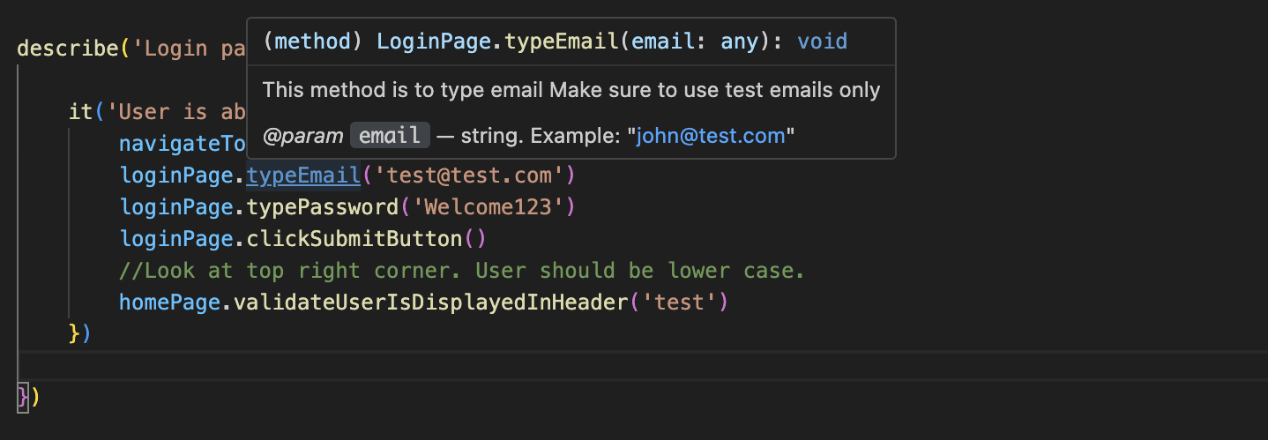
Then in the test, if you hover over the mouse above the method name, you will see a pop-up window with a description of how to use this method properly:
And the last thing is navigation in the code base. When you logically slice your application into page object classes, you can easily navigate between those objects with "dot notation" and code-completion to quickly check which methods are already available and can be reused. Much more comfortable than searching for step definitions.
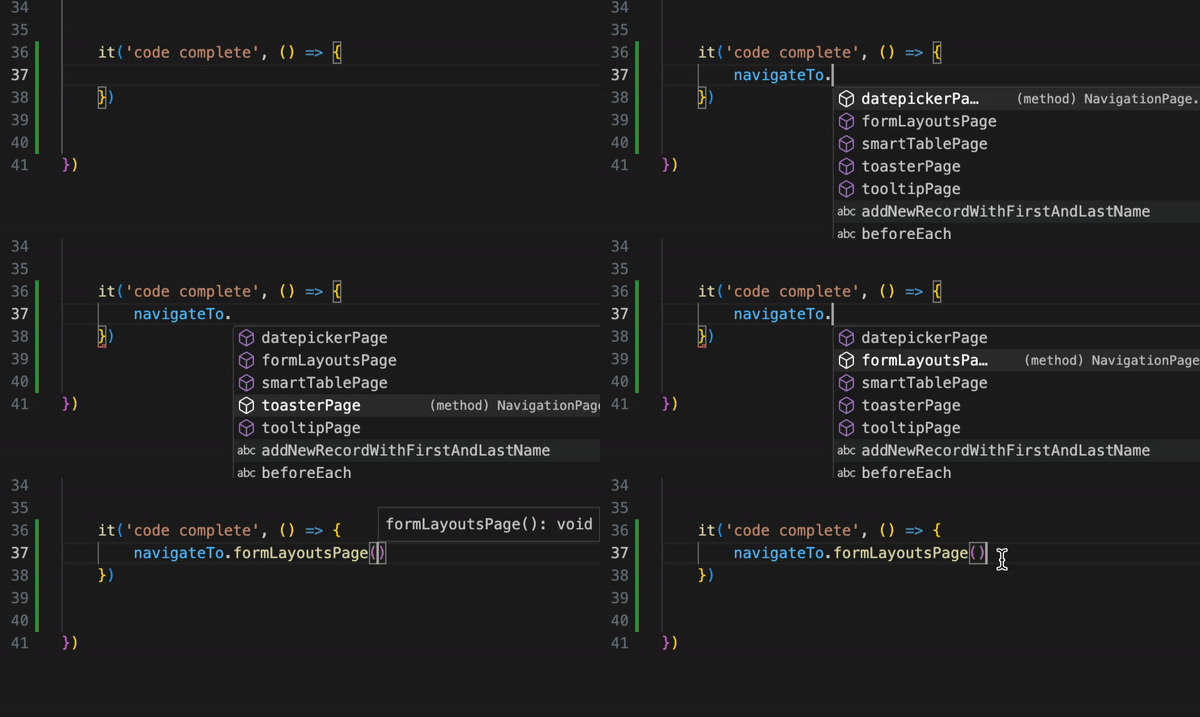
As you can see, Page Objects give you more flexibility, convenience, and pretty much the same readability of the tests. If a company doesn't use true BDD, Cucumber for just test automation is not needed.
Transition to BDD
Let's say you decided to build a framework using only page objects. One year later, the company decided to make a pivot to adopt true BDD, when the team writes scenarios first, writes automation code, and only after that develops application code. Great! With a page object, the transition will be very easy. Everything you'll need is to call already existing page object methods from the step definition implementation. Easy! If your team really decides to go the BDD route, make sure Scenarios are written correctly. The Scenario I showed earlier is fundamentally incorrect, but unfortunately, this is how automation engineers use Cucumber. Read a quick blog post from Aslak with a good example: "Are you doing BDD? Or are you just using Cucumber?"
Final thoughts
I hope this content was convincing enough to prompt you to rethink your test automation approach. Page Objects is not a magic pill, but it's a powerful technique for organizing and managing test code efficiently. In test automation, focus on what matters most: speed, reliability, and test relevance! You are an engineer, so activate your critical thinking to engineer tests most efficiently! Study best practices and don't be afraid to experiment. Study best practices and don't be afraid to experiment.
I wish you to build the frameworks in a way that the person who comes to the project after you will not say: "we need to start from scratch" :)
Microsoft Playwright is growing in popularity on the market very quickly and soon will be a mainstream framework and replace Selenium over time.
Get the new skills at Bondar Academy with the Playwright UI Testing Mastery program. Start from scratch and become an expert to increase your value on the market!
