Using {force: true} often can be a quick solution for non-clickable web elements in Playwright or Cypress. At first, it may seem like a great solution, but a major danger lies behind it.
Recently, one of my followers asked me to look into his test automation script. He was unable to click the specific element on the page, and he could not figure out why. I quickly identified the root cause, and we both found a workaround. But what caught my attention is that the {force: true} flag was used almost everywhere in the action commands, such as click(), check(), and so on. The test was also very flaky because of that. Let me share more about it.
The power of the {force: true}
Both the Cypress and Playwright frameworks have a fantastic auto-waiting mechanism. When you interact with web elements, for example, would like to click on a button, the framework automatically runs many validation checks before the action. Some of those checks are: whether the element is visible, stable, and can receive events, among others. The framework will automatically wait until all those conditions are satisfied before acting, for example, clicking the button. This greatly improves the stability of test execution! But at the same time, if at least one of the actionability checks does not pass, the action is not performed at all, and the test fails.
Web applications are not perfect; they are flaky by design. Sometimes it just does not make sense, why the button is not clickable, as you can see it on the page! However, the framework does not have eyes, it can only read the code. And if the code says the element is not ready for the click event, it will patiently wait for this condition to be satisfied until the timeout expires.
So you, as a superhuman, have the magic power - the force! :)
When you pass the {force:true} flag into the action command, you are essentially telling the framework: "Hey, I know that you don't like something about this button, but I see it on the screen, I can click this button with my mouse, so please do the same". The framework reply will be: "All right, buddy, you set the rules here, I will click this button, but I am not responsible for the result anymore. Will it actually be clicked or not - it's now your problem, not mine."
Unfortunately, new to the Cypress and Playwright frameworks, engineers find this a perfect solution for quickly fixing problems. But in reality, this results only in more problems.
Test flakiness
Disabling the actionability check by using {force: true} you may fix the problem - your script is working, and the framework can perform the click on the desired button. Quick and easy solution. At the same time, you remove the "stability fuse" from your script! The framework is no longer helping you; it's just doing what you tell it to do.
Removing the actionability checks inevitably results in more flaky tests. The more force you use, the flakier the tests become. And it can grow into a complete mess, making it hard to understand the root cause of the stability issues.
What is the solution?
Need to write the test script without using force.
A few things that you can start with are the following:
Analyze the test script and the log output. It often may give you a clue about what is happening
Understand your application. Talk to developers and ask questions about observed behavior. They can provide suggestions or make a fix (it can be a bug)
Look for a workaround to avoid using force as best as you can
Giving the "force" back
Let me show you one example, based on the code of the person I have mentioned above. The method was trying to select a checkbox, and since there was an issue in the application itself, the {force: true} flag was used to overcome this.
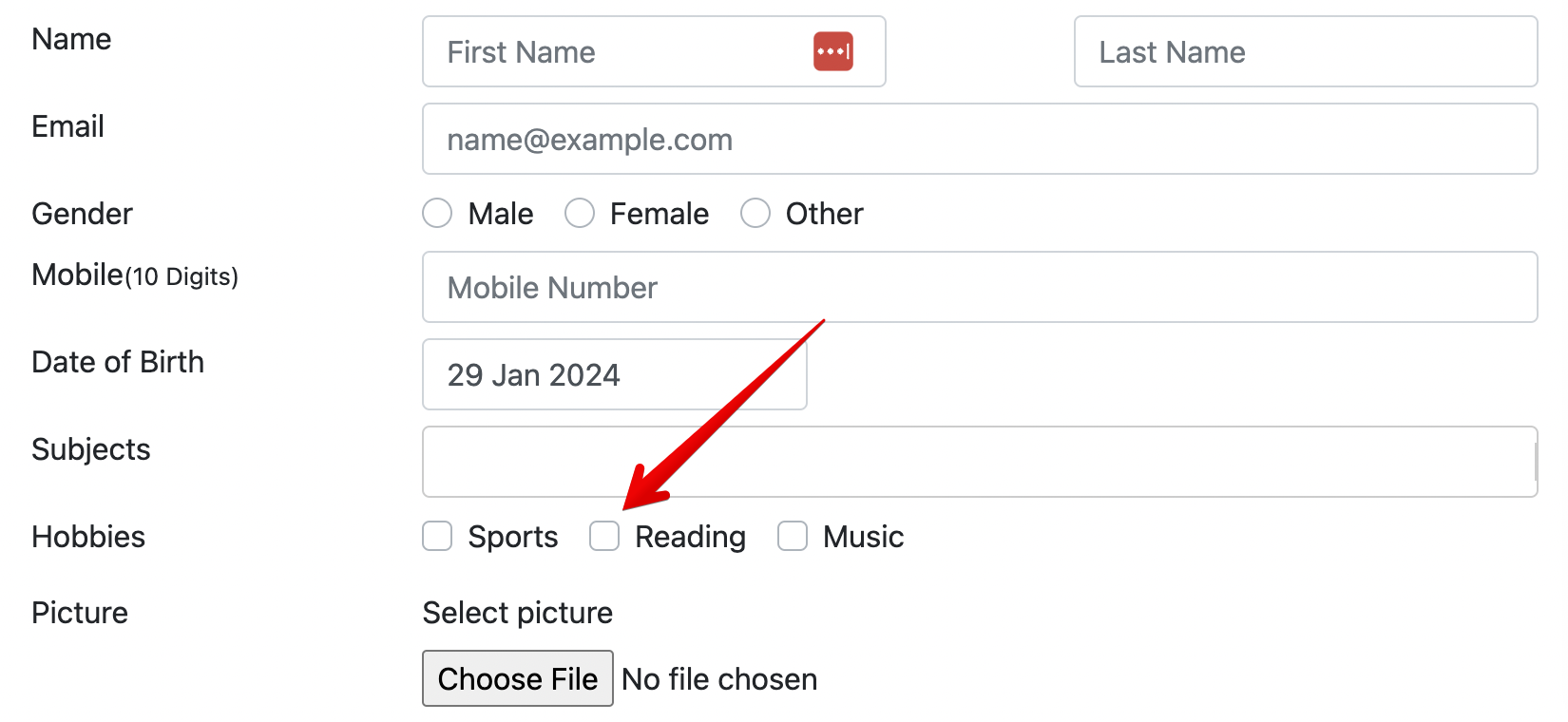
This is the UI of the application, and the checkbox that we need to select
Here is the HTML of this section of the application:
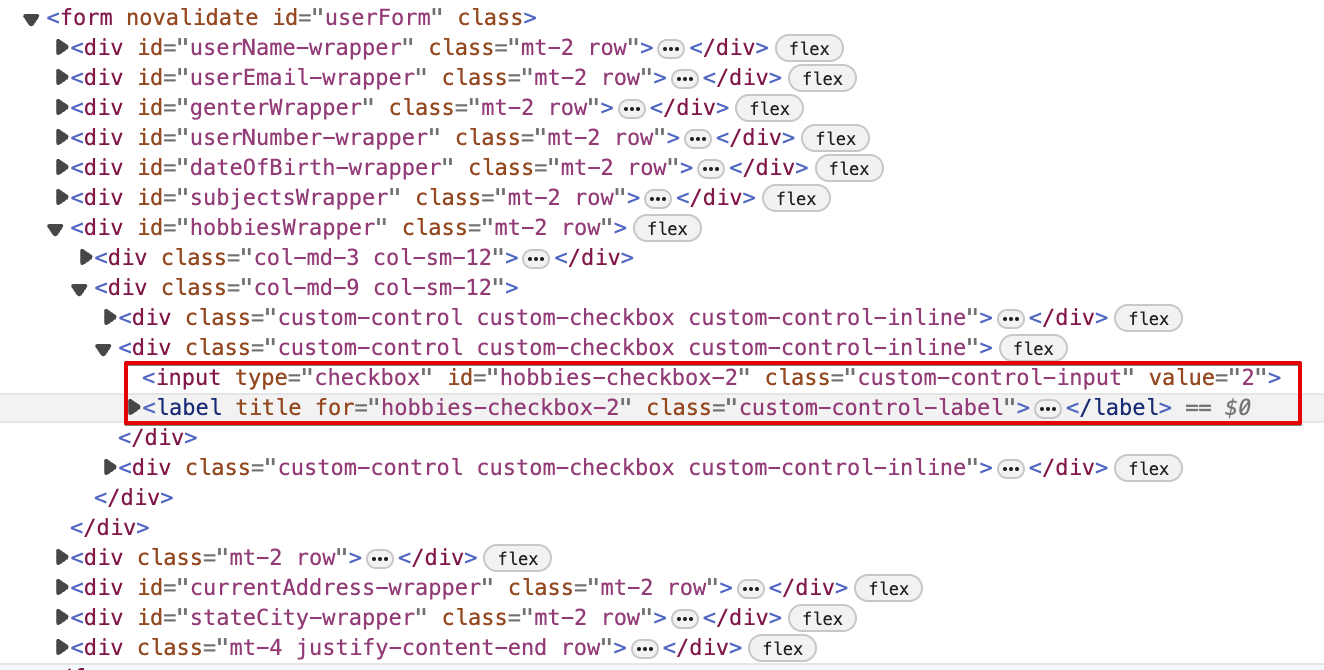
By looking at this, you may say, "easy!" There is a dedicated ID for the checkbox "hobbies-checkbox-2". Just click on that, and you are all set. Unfortunately, it didn't work.
Here is how the original code looked in the script:
async hobbies_check(hobby: string) { await this.page.waitForLoadState('domcontentloaded') const check = await this.page.locator('.custom-checkbox').filter({ has: this.page.locator('.custom-control-label'), hasText: hobby, }) await check.locator("[type='checkbox']").first().check({force:true}) }This method in the page object class was responsible for clicking the checkbox. And it sometimes works, sometimes not :) No wonder, because {force:true} was used to perform a check of the checkbox. Also, if you look at the very first line of the method, looks like the author was battling with other flakiness and was trying to fix it by waiting for the load state.
I have tried to fix the flakiness, and the very first step was to remove {force:true} and check the log to understand the application behavior.
Here is the log:
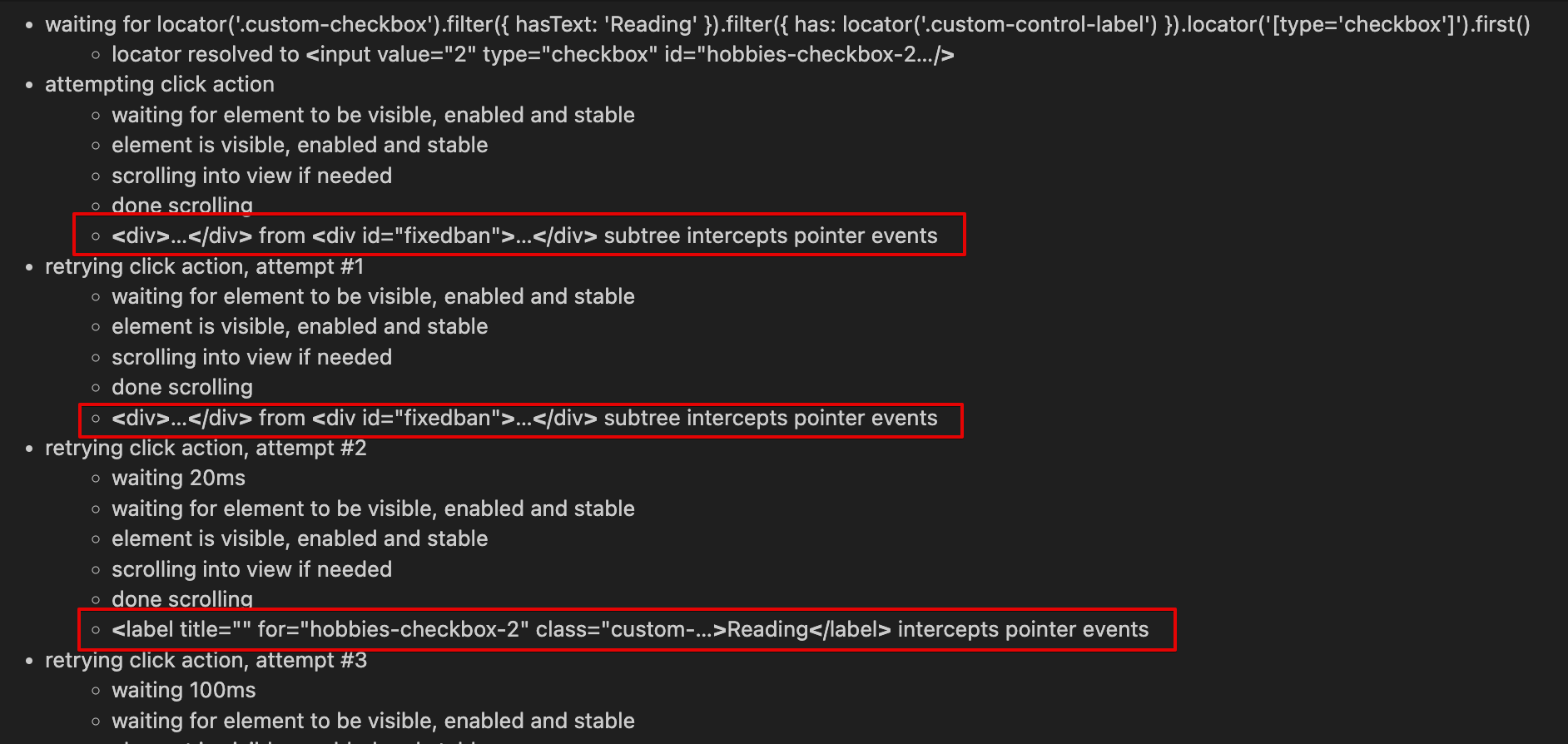
By reading the log, we can see that the first two attempts to click the checkbox were intercepted by an element with the id "fixedban". That page has a bunch of advertising banners, and probably those banners interfered with the attempt to select the checkbox. But on the third attempt, we see that the checkbox label now intercepts the pointer event. Why did that happen? Hard to say. But this label is definitely related to the checkbox we're trying to click. This label is a sibling element in relation to the <input> element of the checkbox that we need to select, and somehow receives the event instead of the <input> field.
When I realized that, the very first idea to try, was to click on the parent <div> for those <label> and <input> elements. Since the <div> is a parent element in relation to <label>, the <label> element will not be able to intercept the pointer event.
Since Playwright's best practice is to use user-visible locators, I have refactored the code above into just a single line and given the power back to the framework to control the stability of the execution
async hobbies_check(hobby: string) { await this.page.getByRole('checkbox', {name: hobby}).locator('..').click()}Now, the Playwright is responsible for waiting for this element to reach an actionable state and ensuring the click is performed only when the element is ready.
Unfortunately, I had to replace check() with click(), so my method cannot determine the checkbox's status. However, in this scenario, it was not important, so using click() was also acceptable. But this change made the test significantly more stable.
Check more in a quick YouTube video:
Final Thoughts
There are situations when, no matter what you try, you can't perform an action on a desired web element. In such cases, {force:true} flag can be a possible solution. But, before doing that, make sure that you really tried everything. Also, run your tests multiple times in different environments, making sure that this particular step with a "force" flag is not flaky. And when your test fails, revisit the places where you have used force, making sure it's not the root cause.
Write a good and clean code, stable tests, and...
Microsoft Playwright is growing in popularity very quickly and will soon become a mainstream framework, eventually replacing Selenium.
Get the new skills at Bondar Academy with the Playwright UI Testing Mastery program. Start from scratch and become an expert to increase your value on the market!
