Struggling with Playwright assertions? You're not alone. Let's dive into this crucial part of test automation and make it crystal clear.
When you're new to Playwright, you quickly figure out the basics of assertions.
But here's the kicker: Playwright has two types of assertions - Locator Assertions and Generic Assertions.
Both start with the expect() method, but they're entirely different beasts.
Generic Assertions: The Quick and Dirty
Here are the features of Generic Assertions:
Execute immediately
Give you instant results
Don't know squat about your app
Take two arguments and run with them
Do exactly what you tell them, no questions asked
Example:
const result = 2 + 2expect(result).toBe(4);Locator Assertions: The Smart Cookie
Here are the features of Locator Assertions:
Only work with web element locators
Perform checks against that locator
Retry if things don't work out at first
Have a 5-second timeout limit (but you can change that)
Example:
await expect(page.locator('#submit-button')).toBeVisible();The Assertion Selection: Which is which?
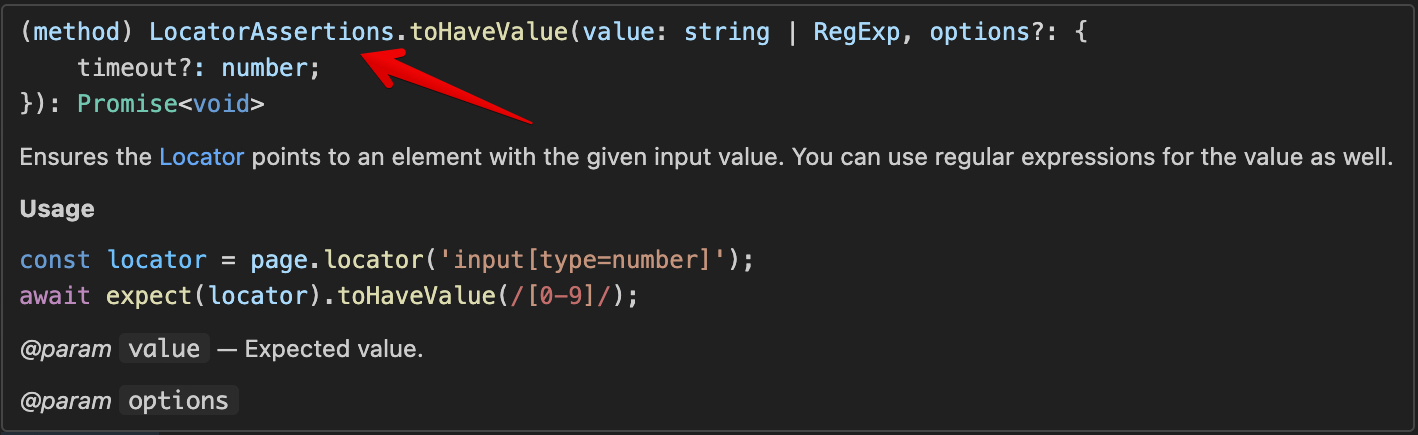
How do you know which assertion to use? It's all in the syntax.
How do you know which assertion to use? It's all in the syntax.
Generic Assertions:
Don't use
awaitArgument must be a value
Locator Assertions:
Must use
awaitProvide a locator as the argument
Hover over the assertion method in VS Code. It'll tell you what you're dealing with.
Best Practices: Don't Shoot Yourself in the Foot
Locator assertions are your go-to. Use them for anything web-related.
Save generic assertions for simple data comparisons.
Why?
Locator assertions have a built-in wait mechanism. They make your tests more stable and less flaky.
Generic Assertions | Locator Assertions |
|---|---|
Immediate execution | Retry mechanism |
Any data type | Web elements only |
No built-in wait | 5-second default timeout |
Common Pitfalls: Don't Fall Into These Traps
Let's say you want to check the text in an input field. You might be tempted to do this:
const inputValue = await page.inputValue('#myInput');expect(inputValue).toBe('Expected Text');But here's a slicker, more reliable way:
await expect(page.locator('#myInput')).toHaveValue('Expected Text');Here's the crucial difference:
With Generic Assertion, the inputValue() method waits until a value is available in the input field (up to the test timeout, which is 30 seconds by default), grabs that value, assigns it to a constant, and Playwright immediately checks whether it matches the "Expected Text".
With Locator Assertion, Playwright waits up to 5 seconds for the "Expected Text" to appear in the input field. If there's any other value currently, it keeps checking until the expected value shows up or the timeout is reached.
See how that could make your tests more reliable.
Let's look at a few more examples that check the number of items in a list:
The old way:
const itemCount = await page.locator('.list-item').count();expect(itemCount).toBe(5);The Playwright way:
await expect(page.locator('.list-item')).toHaveCount(5);Another example. Checking for an empty input:
Instead of:
const inputValue = await page.inputValue('#myInput');expect(inputValue).toBe('');Do this:
await expect(page.locator('#myInput')).toBeEmpty();Timing is Everything: Configuring Timeouts
You've got two ways to set timeouts for locator assertions:
Globally in playwright.config.ts
export default defineConfig({ expect: { timeout: 10000 //10 seconds }});For Individual assertions:
await expect(page.locator('#slow-element')).toBeVisible({ timeout: 30000 });Remember, these timeouts aren't hard waits. They're more like "up to" times. If the element shows up sooner, you're golden. You can read more about timeouts and possible related issues in our blog post here.
Troubleshooting: When Things Go Sideways
If you're not seeing the assertion methods you expect:
For locator assertions, make sure you've got
awaitand you're using a locator.For generic assertions, skip the
awaitand use a plain value.
When using generic assertions, know the difference between toBe() and toEqual(),
check the article in our blog. They're not always interchangeable.
Wrap Up
Playwright assertions are powerful tools when used correctly. Prioritize locator assertions for web elements, keep your tests clean and readable, and don't be afraid to dig into the docs for more advanced uses.
You can find the full list of Generic and Locator assertions in the Playwright documentation with a detailed description of each method and usage example. Always skim through this list to find the most suitable assertion method for your validation.
Now go forth and assert with confidence. Your tests will thank you.
Want to take your Playwright skills to the next level? Check out the Playwright UI Testing Mastery program. It's got everything you need to become a Playwright pro, including a deep dive into assertions and much more.
