Cypress released an AI-powered command, `cy.prompt()`, that converts natural-language steps into executable Cypress code. Write your tests in plain English and let AI do the scripting. But does cypress cy.prompt ai code generation actually work when you test it with real scenarios?
I tested it with simple forms, calendars, iframes, and the self-healing feature. The results were mixed. Let's dive in.
What is cy.prompt and how to set it up
cy.prompt() is an experimental Cypress feature that uses AI to turn natural language instructions into Cypress commands. You describe what you want in plain English, Cypress converts it into real code behind the scenes.
One important thing: this feature requires a Cypress Cloud account. Without it cy.prompt() does not work. No way around it.
To set it up:
Register a Cypress Cloud account
Add this to your Cypress config file:
experimentalPromptCommand: trueOpen the Cypress Runner, go to Runs, and log in with your Cypress Cloud credentials
After synchronization completes, you're good to go
How cy.prompt() AI code generation works
Here is a typical Cypress script for signing into an application:
// Traditional Cypress scriptcy.visit('/login')cy.get('[placeholder="Email"]').type('[email protected]')cy.get('[placeholder="Password"]').type('welcome')cy.contains('button', 'Sign In').click()And here is the same thing using cy.prompt():
cy.prompt([ 'Navigate to the login page', 'Type [email protected] into the email input field', 'Type welcome into the password input field', 'Click the Sign In button', 'Verify the user is logged in'])The command takes an array of strings. Each string is a step that Cypress interprets and converts into Cypress code in the background. I have to say, the execution was reasonably quick. Compared to the Playwright MCP where every step takes quite a lot of time, cy.prompt() was noticeably faster. I liked that.
Caching for faster re-runs
When you run cy.prompt() for the first time, Cypress generates the steps using AI and saves them to a cache. The next run is much faster because Cypress replays the cached steps rather than calling the AI again.
Modify even a single line in your prompt, and Cypress detects the change, re-triggers the AI process, and regenerates all steps inside that prompt. Once the new cache is built, you're back to fast runs.
Two options after code generation
After running cy.prompt(), you have two paths:
Option 1: Save the generated code. Click the code button in the Cypress Runner, review the generated steps, and save them to your test file. Your original prompt gets commented out, and the generated Cypress commands replace it line by line. This is basically a way to scaffold your script faster.
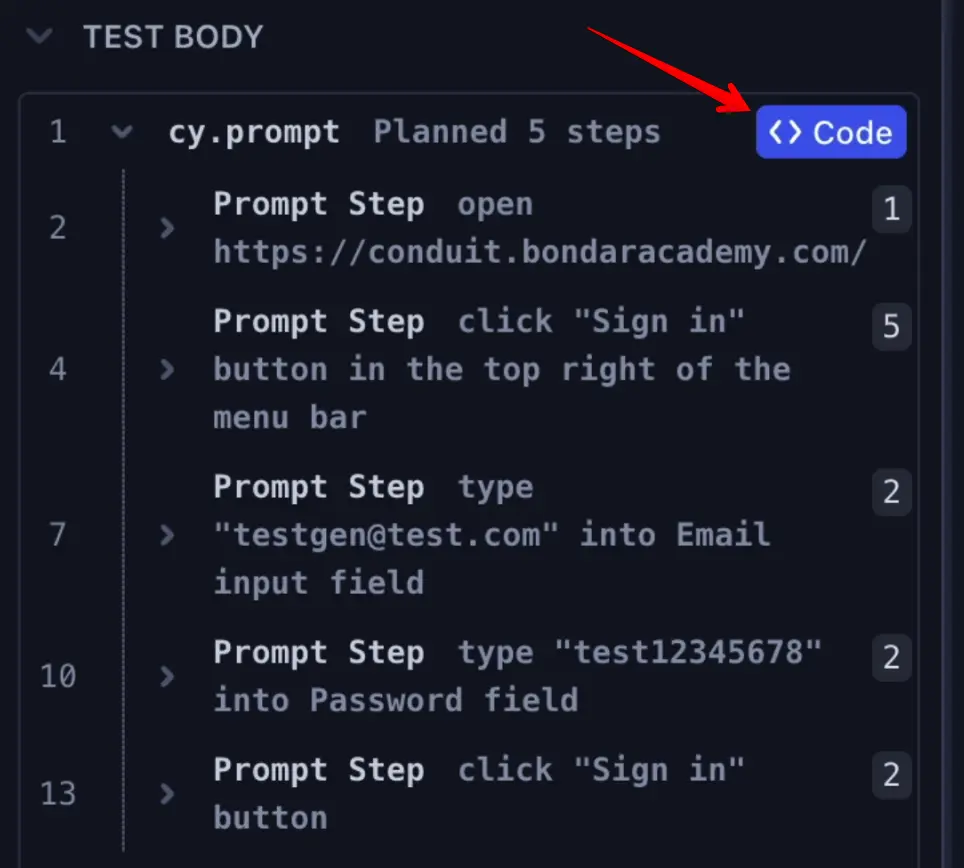
Option 2: Keep the prompt as-is. Leave cy.prompt() in your test file. Every time you run the test, it uses the cached result. If the test fails, Cypress re-triggers the AI to automatically regenerate the steps.
The locator quality problem
When cy.prompt() generates code, pay close attention to the locators. This is where the problems start.
For example, the prompt "Click the Sign In button" generated:
// AI-generated locatorcy.get('a[routerlink=\"/login\"]').click()And "Type email into email input field" became:
// AI-generated locatorcy.get('input[form-control[\"email\"]]').type('[email protected]')Now look at how I would write the same steps:
// Hand-written locatorscy.contains('button', 'Sign In').click()cy.get('[placeholder="Email"]').type('[email protected]')See the difference? Locators like input[form-control] or a[routerlink] are brittle. They work on a simple application, sure. But in a real app, these selectors will break the moment a developer refactors a CSS class or changes a router path. Locators using placeholder or visible text are just more stable and descriptive.
I noticed this pattern consistently. The AI creates workable locators, but not the locators you'd want in a production test suite. Not even close.
Testing complex scenarios with cy.prompt
Basic forms are one thing. But how does cy.prompt() handle something more complex? Let's see.
Calendar date picker
I tried selecting October 29th from a calendar component of my test application. My first prompt:
cy.prompt([ 'Click on the form picker input field', 'Select October 29th in the calendar'])Seems like a clear prompt from a human perspective, right? But the AI couldn't figure it out. It expanded the calendar fine, then had no idea what "select October 29th" means in terms of DOM elements. Test failed.
I rewrote the prompt to be more specific:
cy.prompt([ 'Click on the form picker input field', 'Click the value 29 in the calendar'])This worked. But when I looked at the generated locator... oh my god. A long, fragile chain of CSS selectors that you would never write by hand. Absolute madness.
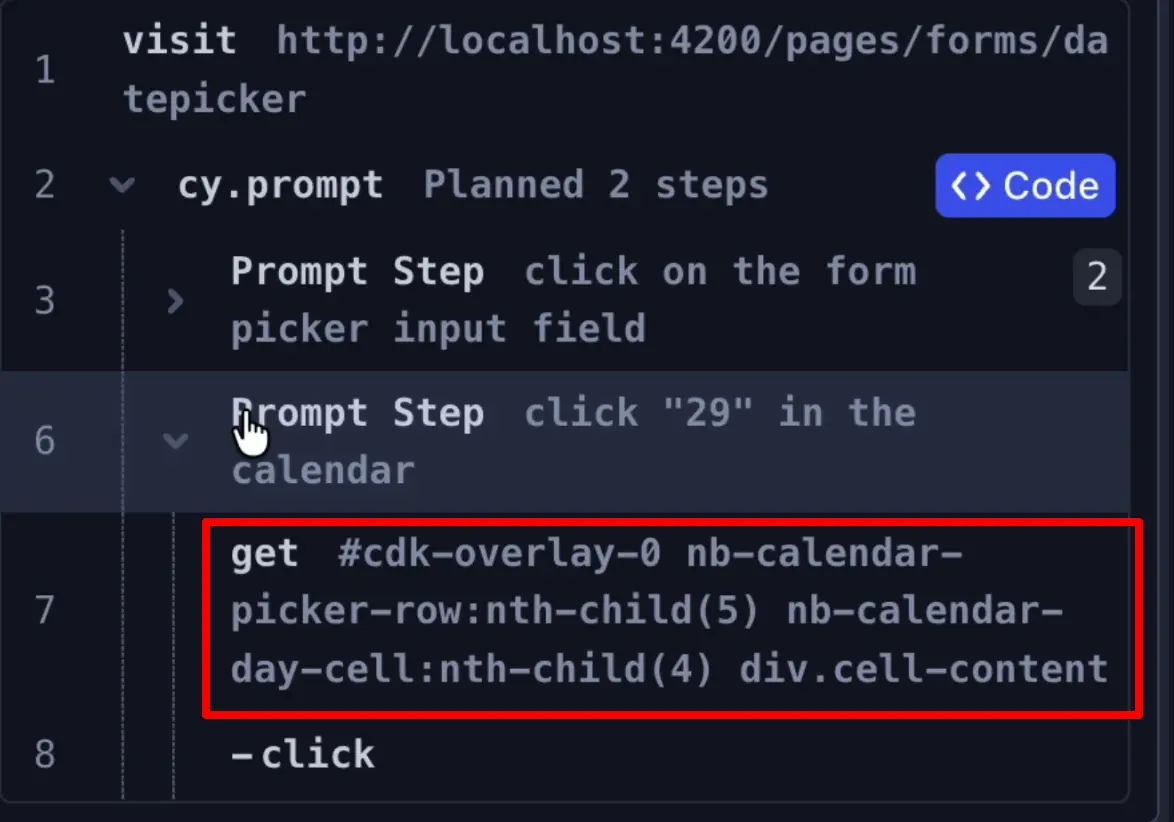
I also tested verification: "Verify October 29 is displayed in the input field." The assertion was generated correctly, which was a positive. But the locator for the input field was awful. Instead of reusing the same placeholder attribute that was right there, available, AI generated a completely new, more brittle selector. Why? I have no idea.
Iframes
Cypress has a painful history with iframes. They're tricky to work with and often don't behave reliably. I hoped the AI feature would handle this better.
I had two buttons inside an iframe. My prompt: "Click the Open Dialog with Escape to Close button." Simple. Just click a specific button by its name.
Unfortunately, cy.prompt() could not handle iframes at all. Instead of going into the iframe and clicking the right button, it clicked a completely different button outside the iframe. If you're working with iframes, don't count on cy.prompt().
Self-healing: does it actually work?
Self-healing triggers automatically when something changes in your application between test runs. Cypress uses AI to detect the change and fix the selector on its own. Sounds great in theory.
Here is my test. A form with First Name, Last Name, and Username fields of this table:
cy.prompt([ 'Type Artem into the first name', 'Type Bondar into the last name', 'Type tester into the username'])All three fields filled correctly. But then I simulated a developer changing "Username" to "Middle Name" in the application. The prompt still said "type tester into the username," but the username field no longer existed on the page.
So what happened? Cypress entered First Name and Last Name correctly, but during the username step it entered the value into the ID field. Not the Middle Name field. The ID field. The AI couldn't figure out that "username" was renamed to "middle name," so it just found some other available input and dumped the value there.
Be very careful with self-healing. Keep it supervised. I would not trust this running unattended in a CI pipeline.
cy.prompt syntax best practices
Cypress recommends a few rules for writing effective prompts. Start with an action word: click, type, enter, tap, or hover. Put visible values in double quotes for more precise targeting, for example 'Click the "Sign In" button'. Be as specific as possible in your descriptions. And remember, this feature only works with Cypress Cloud.
Usage limits
cy.prompt() has usage limits:
Account Type | Prompts/Hour | Prompt Steps/Hour |
|---|---|---|
Free | 100 | 500 |
Paid | 600 | - |
For generating steps, these limits seem fine. But keep them in mind if you plan to run cy.prompt() across a large test suite.
Final Thoughts
So how would I use cy.prompt() in a real project? Honestly, I don't know. Maybe I'd keep a single cy.prompt() line somewhere for scenarios where a stable locator is just impossible, or where selectors constantly change. A last resort, fingers crossed that AI picks the right element :)
But I would not trust cy.prompt() to generate locators for a real production test suite. The locator quality is questionable, complex scenarios like calendars produce wild selectors, iframes don't work, and self-healing misfired in my testing. You saw what happened with the username field.
If you want reliable test automation, invest time in writing proper locators and use best practices for element selection. That will serve you better than relying on AI-generated code.
Cypress is the easiest scripting framework for UI automation on the market. Master test automation with the Cypress UI Testing Mastery program. Build a real hands-on skill and a deep understanding of the framework through practice assignments, GitHub code reviews, and individual feedback.
Frequently Asked Questions
What is cy.prompt() in Cypress?
cy.prompt() is an experimental Cypress command that uses AI to convert natural language test steps into executable Cypress code. You write steps in plain English, and Cypress generates the corresponding commands automatically.
Does cy.prompt work without Cypress Cloud?
No. cy.prompt() requires a Cypress Cloud account. Without it, the feature does not work at all, even for local development.
Is cy.prompt AI code generation reliable for production tests?
The generated locators are often brittle. Simple scenarios work fine, but complex UI elements like calendars and iframes produce unreliable selectors. I would not rely on it for production test suites without careful review.
How does cy.prompt self-healing work?
When your application changes between test runs and a cached step fails, Cypress re-triggers the AI to regenerate the selector. The self-healing can misfire though. In my test, it typed a value into the wrong field after a label was renamed.
What are the usage limits for cy.prompt?
Free accounts get 100 prompts per hour or 500 prompt steps per hour. Paid accounts get 600 prompts per hour.
Can cy.prompt handle iframes in Cypress?
No. In my testing, cy.prompt() was not able to interact with elements inside iframes. It clicked elements outside the iframe instead of navigating into it.
