Have you ever looked at your test file and noticed the same test repeated four, five, maybe ten times with just slightly different values? If yes, data-driven testing in Playwright is exactly what you need. You run the same test multiple times, each with a different dataset. No copy-pasting. No duplicated logic.
Let's dive in.
What is data-driven testing?
Data-driven testing is when you take a single test scenario and run it against multiple sets of input data. Instead of writing separate test cases for every variation, you define your data in one place and let the framework iterate through it.
Why?
Because repeating the same test logic over and over is a maintenance nightmare. When the test flow changes, you have to update every single copy. With data driven tests, you update the logic once and it applies to all your data sets.
The problem: duplicated test code
Let me show you the problem with a real example. On our Conduit application, we have a sign up form with a username field. The validation rules are simple: username must be between 3 and 20 characters. That gives us four test cases:
2 characters - should show "username is too short"
3 characters - should NOT show an error
20 characters - should NOT show an error
21 characters - should show "username is too long"
The naive approach? Write four separate tests:
test('signup with 2 char username', async ({ page }) => { await page.getByText('Sign up').click(); await page.getByPlaceholder('Username').fill('ab'); await page.getByPlaceholder('Email').fill('[email protected]'); await page.getByPlaceholder('Password').fill('HelloWorld1'); await page.getByRole('button', { name: 'Sign up' }).click(); await expect(page.locator('.error-messages')).toContainText('username is too short');});test('signup with 3 char username', async ({ page }) => { await page.getByText('Sign up').click(); await page.getByPlaceholder('Username').fill('abc'); await page.getByPlaceholder('Email').fill('[email protected]'); await page.getByPlaceholder('Password').fill('HelloWorld1'); await page.getByRole('button', { name: 'Sign up' }).click(); await expect(page.locator('.error-messages')).not.toContainText('username');});// ... and two more tests with 20 and 21 charactersYou see the problem? It's the same test copy-pasted with different values. Now imagine you need to change a locator or add another step. You'd have to update all four tests. Not optimal at all.
How to create data-driven tests in Playwright
So let's refactor this test using a data-driven approach.
Create the dataset
First, you need to create a dataset. In Playwright, you use a simple JavaScript array and put objects inside it. Each object is one test case with its own data:
const testData = [ { username: '12', errorMessage: 'username is too short', isErrorDisplayed: true }, { username: '123', errorMessage: '', isErrorDisplayed: false }, { username: '12345678901234567890', errorMessage: '', isErrorDisplayed: false }, { username: '123456789012345678901', errorMessage: 'username is too long', isErrorDisplayed: true },];Notice the isErrorDisplayed flag. We have cases where the error message should be displayed and cases where it should not. To drive this logic in the test, we use this boolean flag. When it's two characters, the error should appear, so true. When it's three or twenty characters, no error, so false. And when it's twenty-one characters, a different error appears, so true again.
Loop with forEach
Now call the forEach method on your array. This is just a regular JavaScript forEach that loops through the array. On every iteration, it grabs one object and runs the test with that data:
testData.forEach(({ username, errorMessage, isErrorDisplayed }) => { test(`Error message test: ${username}`, async ({ page }) => { await page.getByText('Sign up').click(); await page.getByPlaceholder('Username').fill(username); await page.getByPlaceholder('Email').fill('[email protected]'); await page.getByPlaceholder('Password').fill('HelloWorld1'); await page.getByRole('button', { name: 'Sign up' }).click(); if (isErrorDisplayed) { await expect(page.locator('.error-messages')).toContainText(errorMessage); } else { await expect(page.locator('.error-messages')).not.toContainText(errorMessage); } });});A few things to notice here.
Inside the forEach callback, I destructure username, errorMessage, and isErrorDisplayed directly from the object. These are the variables that hold the value for each cycle of our test run. Instead of hard-coded values, I just use these variables.
And the if/else block at the bottom? That's where the isErrorDisplayed flag comes into play. When it's true, we validate the error message. When it's false, we validate that the error message is NOT displayed. So we put .not before our assertion. That's it, the refactoring is done.
Run and verify
Let's run the tests and make sure everything works. You will see four separate test executions in the Playwright report, each with a unique name based on the username value:
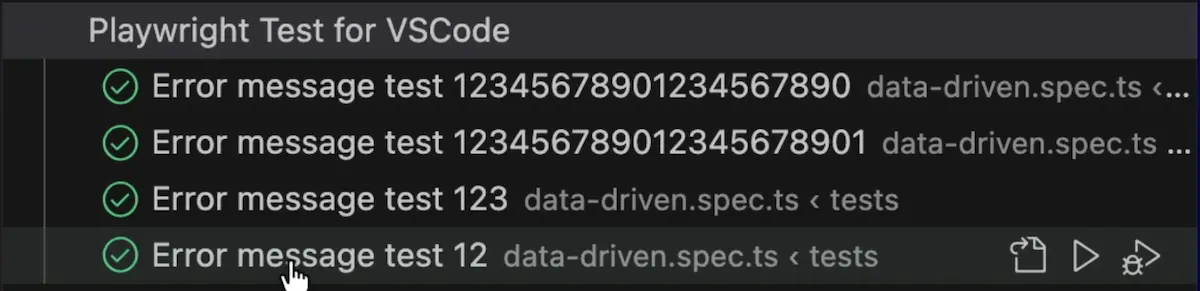
Everything works correctly and look at the report execution. We see four different tests, not just a single test. Every test has a unique name based on the variable value that we used.
Before and after
So what do we have so far?
Before, we had four separate test blocks, each around 8 lines. That's 32+ lines of mostly copy-pasted code.
After, we have one dataset array and one test block inside a forEach. About 20 lines total. Zero duplication.
The logic lives in one place. Need to add a fifth test case? Add another object to the array. Need to change a locator? Update it once. Yes, that simple :)
When to use data-driven testing
Data-driven testing works best when your test scenarios follow the same flow but differ in input data and expected results. Think form validation with boundary values, search functionality with different terms, login scenarios with valid and invalid credentials, or API testing with different payloads and expected status codes.
If your tests share the same steps but different data, convert them to data-driven tests. It makes your test suite easier to maintain and way cleaner to read.
TIP: For more advanced parameterization, check the official Playwright docs on test parameterization. You can also parameterize at the project level in
playwright.config.tsto run your entire test suite against different environments or configurations.
Final Thoughts
That's how easy it is to use data-driven testing. If you feel you have test scenarios with similar flows but different test data, convert them to data-driven tests. It makes so much sense, and it's actually very easy to do. Your code gets shorter, and you only maintain one test instead of four. Or ten. Or however many you were about to copy-paste :)
Playwright is growing in popularity in the market very quickly and will become a mainstream framework over time. Get the new skills at Bondar Academy with the Playwright UI Testing Mastery program. Start from scratch and become an expert to increase your value on the market!
Frequently Asked Questions
What is data-driven testing in Playwright?
Data-driven testing in Playwright involves running the same test multiple times with different input data. You define your test data as an array of objects and use forEach to generate individual test cases for each dataset.
How do you parameterize test names in Playwright?
Use template literals (backticks) instead of single quotes for your test name, and include a variable from your dataset. For example: test(`my test: ${variable}`, ...). This gives each generated test a unique name.
Can you use external files like JSON or CSV for data-driven tests?
Yes. You can read data from JSON files using import or require, or parse CSV files using libraries like csv-parse. The data goes into your forEach loop the same way as an inline array.
How do you handle both positive and negative test cases in data-driven tests?
Add a boolean flag like isErrorDisplayed to your dataset objects. Inside the test, use an if/else condition to run different assertions based on the flag value.
Does each data-driven test run independently in Playwright?
Yes. Each iteration of forEach creates a separate test case. They run independently, appear as separate entries in the test report, and if one fails, it does not affect the others.
