Mocking is the process of replacing dynamic data in your application with your own custom data. Instead of relying on real API responses, you intercept the network call and provide whatever response you need. In Playwright, this takes just a few lines of code.
Why would you need to mock API responses in the first place?
Maybe you want to test an edge case that is difficult to set up using your real database. Loading 1,000 users just to check how pagination renders? That's a lot of work for one test. Or maybe you have a slow API that keeps flaking your test environment, and you want to eliminate that flakiness by controlling the response yourself. Or your application depends on a third-party API that is unreliable in the test environment. Mock just that one endpoint and your tests become stable and fast.
Let's dive in.
How API Mocking Works in Playwright
Before we jump into code, let's understand what actually happens when you mock an API. When your web application loads, it makes HTTP requests to backend APIs to fetch data. You can see these requests in the browser's Network tab.
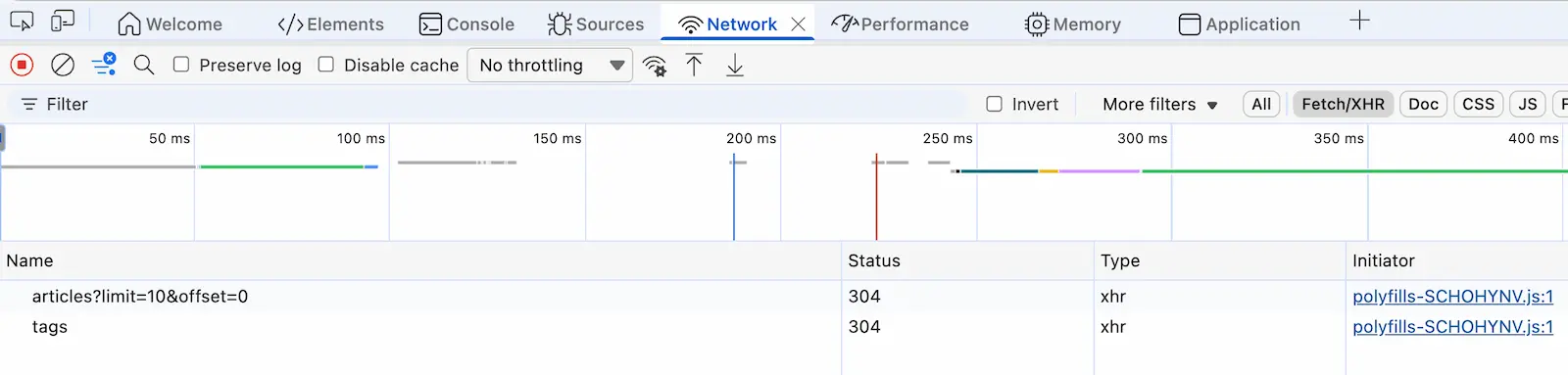
In my Conduit app, the homepage calls a /api/tags endpoint and an /api/articles endpoint. The tags endpoint returns a JSON object with a list of tag names that get rendered in a sidebar. The articles endpoint returns blog post data for the main feed.
How does Playwright intercept these calls?
Playwright sits between the browser and the network. With page.route(), you tell Playwright to watch for a specific URL pattern. When the browser tries to make that request, Playwright catches it before it reaches the server. Then, with route.fulfill(), you provide your own response. The browser gets your mock data as if it came from the real API. The application has no idea the difference.
This is also why mocking is instant. No network round-trip, no server processing, no database query. Just your predefined JSON delivered immediately.
How to Set Up API Mocking in Playwright
To mock an API response in Playwright, you need two methods: page.route() to intercept the request, and route.fulfill() to provide your custom response.
One important rule: you must define the interception before the application makes the API call. If you set up the mock after the page loads, the real request has already fired, and your mock won't work.
If your application makes API calls immediately on page load, your page.route() call must come before page.goto().
test('should display custom tags', async ({ page }) => { // Set up the mock BEFORE navigating await page.route('https://conduit-api.bondaracademy.com/api/tags', async route => { const tags = { tags: ['Artem', 'Bondar', 'YouTube'] }; await route.fulfill({ body: JSON.stringify(tags), }); }); // Now open the application await page.goto('https://conduit.bondaracademy.com/'); // Verify the mocked data is displayed await expect(page.locator('.tag-list')).toContainText('Artem');});Notice the order. First, we tell Playwright what to intercept and what to respond with. Then we open the application. When the app makes a GET request to the /api/tags endpoint, Playwright catches it and returns our custom tags instead.
One thing that tripped me up at first: without that assertion at the end, the test finishes too quickly. Playwright disconnects the browser before the page even renders the mocked data. The expect assertion gives Playwright a reason to wait for the content to appear. If you have ever struggled with Playwright not waiting for elements, this is a related concept.
If your mock doesn't seem to work, check two things: is the page.route() call placed before page.goto()? And does your test have an assertion that gives Playwright enough time to render the mocked response?
Mock API Response with Wildcard URL Patterns
In the example above, we used the full API URL. That works, but it ties your test to a specific environment. If the base URL changes between staging and production, your mock breaks.
Use wildcard patterns instead:
await page.route('**/api/tags', async route => { const tags = { tags: ['Artem', 'Bondar', 'YouTube'] }; await route.fulfill({ body: JSON.stringify(tags), });});The **/api/tags pattern matches any URL that ends with /api/tags, regardless of the domain or protocol. Your mock now works across all environments without changes. Yes, that simple :)
Store Mock Data in External Files
In a real project, your mock response objects can get big. Keeping them directly in your test files makes the code hard to read. A better approach is to save mock data in separate JSON files and import them.
Create a mocks folder in your project and add a JSON file for each mock:
// mocks/tags.json{ "tags": ["Artem", "Bondar", "YouTube"]}Then import it in your test:
import tags from '../mocks/tags.json';test('should display custom tags', async ({ page }) => { await page.route('**/api/tags', async route => { await route.fulfill({ body: JSON.stringify(tags), }); }); await page.goto('https://conduit.bondaracademy.com/'); await expect(page.locator('.tag-list')).toContainText('Artem');});Your test file stays clean and your mock data lives in one place. When the response object is 100 lines of JSON, you will appreciate this separation.
Think about the articles endpoint response from the Conduit app. It has nested objects with author information, timestamps, tag lists, and article content. You don't want all of that sitting in the middle of your test file. Save it in mocks/articles.json, import it, and move on. Updating mock data later becomes a simple JSON edit.
Conditional API Interception in Playwright
Sometimes you need more control over which requests get mocked. Maybe you want to intercept only GET requests to an endpoint but let POST requests pass through to the real server. Or you want to mock only requests that contain specific data in the body.
How?
The route.request() method gives you access to details about the intercepted request. You can check the HTTP method, headers, or POST body before deciding what to do.
await page.route('**/api/tags', async route => { if (route.request().method() === 'GET') { // Mock the GET request const tags = { tags: ['Artem', 'Bondar', 'YouTube'] }; await route.fulfill({ body: JSON.stringify(tags), }); } else { // Let all other requests pass through await route.continue(); }});GET requests to /api/tags return our mock data. POST, PUT, or DELETE requests continue to the real backend untouched. This is useful when your application reads and writes to the same endpoint and you only want to fake the reads.
You can also filter by POST body content:
await page.route('**/api/articles', async route => { if (route.request().method() === 'POST' && route.request().postData()?.includes('draft')) { await route.fulfill({ body: JSON.stringify({ article: { status: 'draft_saved' } }), }); } else { await route.continue(); }});So you can get really specific about what gets mocked and what doesn't.
When to Mock API Responses and When Not To
I want to be straight with you: don't overuse mocking.
When you mock an API response, you are replacing the real integration between your frontend and backend with a fake one. That makes your test faster and more stable, yes. But you are no longer testing the actual connection between the two systems.
If you mock too many endpoints, you might end up with a beautiful green test suite that misses a real defect. The frontend renders everything perfectly, but the backend changed its response format two weeks ago, and nobody caught it because all your tests use mocked data.
When should you mock? Slow endpoints that cause flaky tests. Edge cases that are hard to set up with real data. Third-party APIs that are unreliable in test environments. These are good reasons.
But your core business flows? Those should be real end-to-end tests. No mocking.
Mock the endpoints that cause problems, let everything else hit the real backend. Stability where you need it, real integration coverage where it matters.
Final Thoughts
That's it! Mocking API responses in Playwright comes down to page.route() and route.fulfill(). Two methods, and you control what your application sees from the network. Wildcard patterns make your mocks portable across environments, external JSON files keep your code clean, and conditional logic lets you be precise about what gets intercepted.
Just don't mock everything. Keep your core test automation flows real. Mock only where it actually helps.
Playwright is growing in popularity in the market very quickly and soon will be a mainstream framework. Get the new skills at Bondar Academy with the Playwright UI Testing Mastery program. Start from scratch and become an expert to increase your value on the market!
Frequently Asked Questions
Do I need to set up the mock before navigating to the page?
Yes. You must call page.route() before page.goto() or any action that triggers the API call. If the request fires before the interceptor is in place, Playwright won't catch it.
Can I mock only specific HTTP methods like GET or POST?
Yes. Inside the route handler, use route.request().method() to check the HTTP method. Fulfill the request for the methods you want to mock and call route.continue() for everything else.
Does mocking API responses work with Playwright fixtures?
It does. You can set up Playwright fixtures that configure your mocks, so they're reusable across multiple tests without duplicating the page.route() setup.
What is the difference between route.fulfill() and route.continue()?
route.fulfill() returns a custom response without hitting the real server. route.continue() lets the request go through to the actual backend. Use fulfill for mocking and continue for pass-through.
Can I mock API responses in Playwright for multiple endpoints?
Call page.route() multiple times, once for each endpoint you want to intercept. Each route handler works independently, so you can mock /api/tags and /api/articles with different responses in the same test. No problem at all.
Should I mock all API calls in my Playwright tests?
No. Mock selectively. Over-mocking hides real integration defects between your frontend and backend. Use mocking for slow, flaky, or third-party endpoints, and keep your core business flows as real end-to-end tests.